Chapter 2 · The Promise & The Machine
End-to-end encrypted journal: what it actually means
Yes, your journal stays private, and here is what that rests on. Awaken Journal by Everything Awaken is an end-to-end encrypted journal: every entry is sealed on your own device, with a key only your password can unlock, before anything is sent. Our server stores the scrambled result. It never receives your password or the key.
That's the short answer. The rest of this post explains what "end-to-end" adds to plain "encrypted", how the sealing works in this app, and the few things that are not sealed, named exactly.
Why this is the first question
Most people who ask it aren't asking about maths. They're asking whether they can write the thing they have never said out loud. People write differently when they believe someone might read it: they soften it, leave it out, or write for an imagined audience instead of for themselves. A journal only works if that imagined reader isn't there.
So privacy here is not a feature sitting beside the journal. It's the condition the journal needs to be honest at all, and that's why the app was built around it from the first line of code.
"Encrypted" is not one thing
Almost every app says your data is encrypted. That word can mean three very different things, and the difference is one question: who holds the key?
- Encrypted in transit. Your data is scrambled while it travels between your phone and the server (this is the padlock in your browser, HTTPS). It arrives readable on the other side.
- Encrypted at rest. The company scrambles your data on its own disks, but it keeps the key, so it can unscramble it whenever it needs to, or is made to.
- End-to-end encrypted. Your data is scrambled on your device, and the key stays with you. The server only ever holds the scrambled version. Nobody in the middle, including the company running the server, has the key.
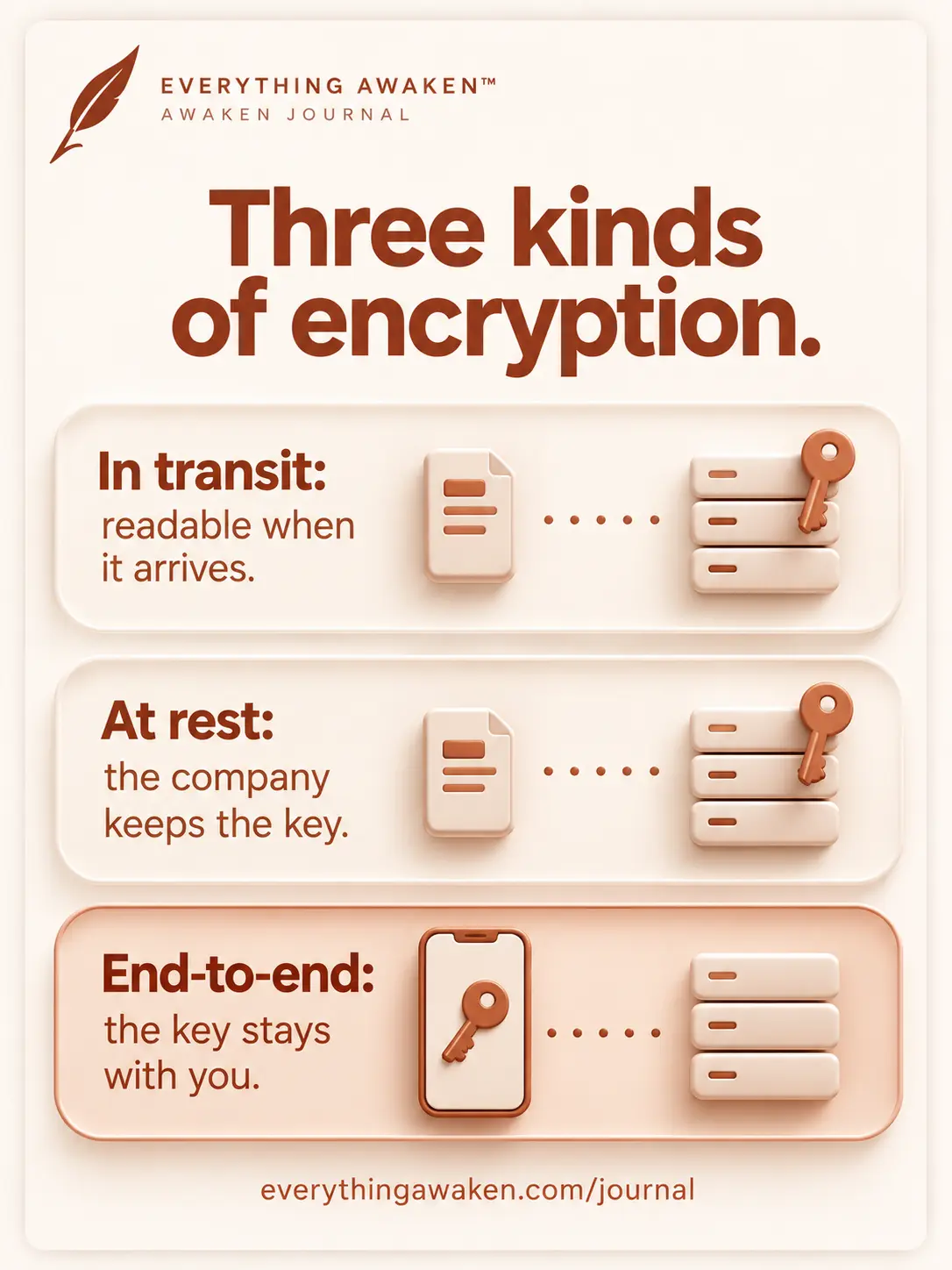
Awaken Journal uses all three layers, but only the last one is the promise. HTTPS is still there, and it's the least interesting protection in the app, because your words are already sealed before they start travelling.
Three kinds of "encrypted", and who can read your words in each.
How your entries are sealed in Awaken Journal
When you create an account, three things happen on your device, not on our server:
- Your device makes a random master key. This is the key that actually seals your entries. It's random, not made from your password, and it never leaves your device in readable form.
- Your password is turned into a second key. The app runs your password through Argon2id, a deliberately slow scrambling method, to produce a key that only your password can recreate.
- That second key locks the master key in a lockbox. The locked master key is what gets sent to our server. We hold the lockbox. We never hold what opens it.
From then on, every time you save a journal line, a task, a note or a transaction, your device seals it with the master key using AES-GCM before it's sent. Each seal uses a fresh random starting value, so writing the same sentence twice still produces two different scrambles.
When you log in on another device, it rebuilds the same keys from your password, opens the lockbox, and gets your master key back. The key itself never travels between your devices or through us.
What our server receives: ciphertext, the locked master key, two random salts, and a proof that you know your password. What it never receives: your password, the key made from your password, or your master key.
The honest boundary: what isn't sealed
Not everything can be sealed. To hand you back the right entry on the right day, the server needs a little information it can read. We'd rather name it than hide it behind "certain data".
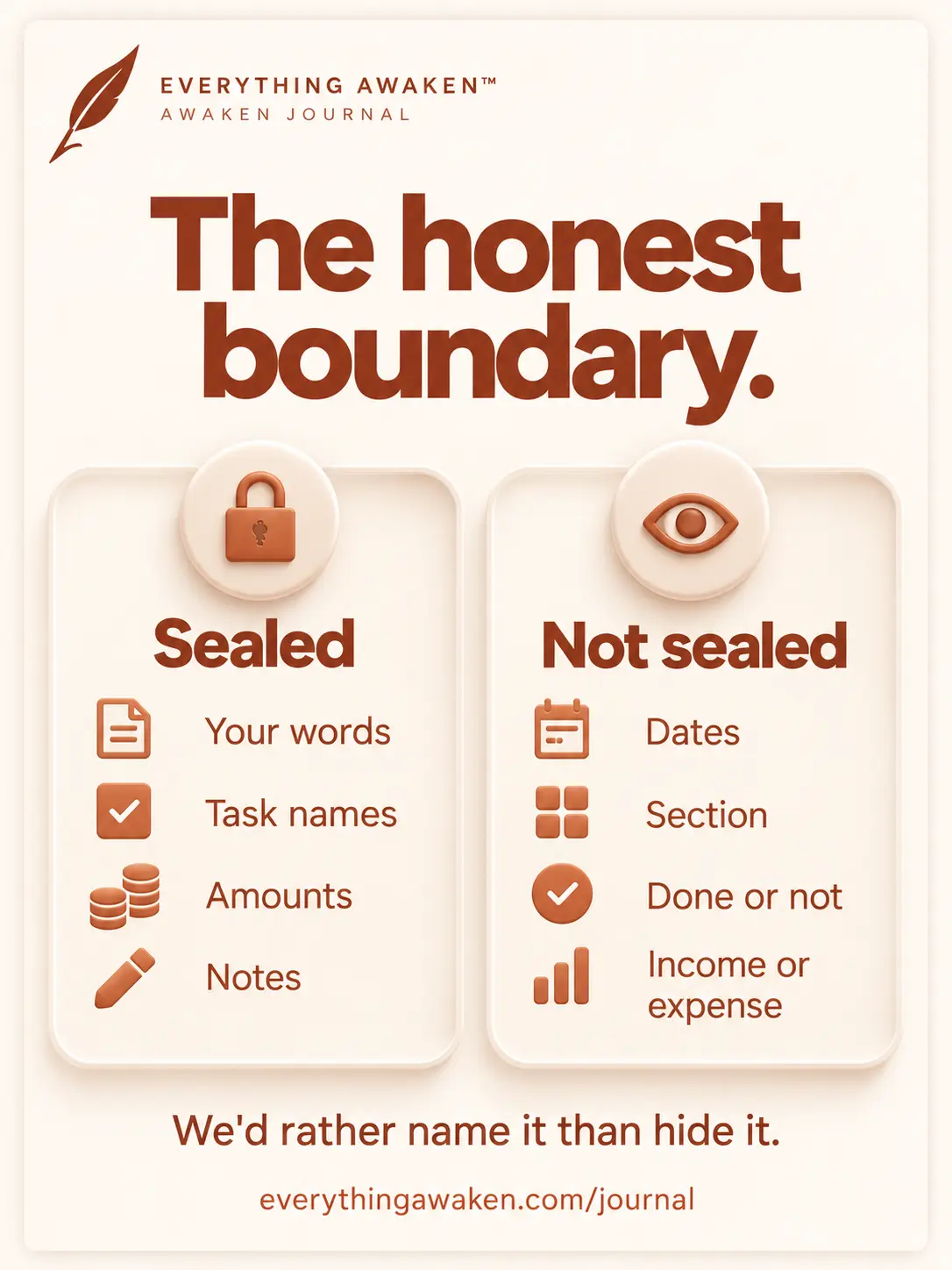
- Journal: the date of an entry, which section it belongs to (the built-in ones like Gratitude or Thoughts show by name; a section you create yourself shows only as a random ID, and its name is sealed), and its position in the list.
- To-Do: whether a task is a Frog, a Goal or Urgent, whether it's done and on which day, which day or week it belongs to, and which Role or Area it's filed under (as a random ID; the names of your Roles and Areas are sealed). The task's name and notes are sealed.
- Finance: a transaction's date, whether it's income, expense or a transfer, and which account and category it's filed under (again as IDs). The amount, the note, and your account and category names are sealed.
- Everywhere: when something was saved, and roughly how much you wrote, because a longer entry makes a longer scramble.
The words you wrote, the tasks you named and the amounts you spent never cross in readable form. The next post in this chapter lists everything else the server holds about your account, field by field.
What stays sealed, and what travels as plain metadata so the app can sort your days.
What end-to-end encryption doesn't cover
Encryption protects your words on their way to us and while we hold them. It can't fix everything, and pretending otherwise would be the first dishonest line in this chapter.
- An unlocked device. Anyone holding your phone while you're logged in can read what you can read, as with any app. Your screen lock is the first line of defence.
- A forgotten password. Because only your password opens the lockbox, we can't reset it for you. If you forget it and have no other way in, your entries can't be recovered by anyone, including us. Write it down somewhere safe. If you signed in with Google or Apple, that means your vault passphrase.
- Your account details. Your email and username are not your writing, and they're stored readable so you can log in.
Check it yourself
You don't have to take this post's word for it. On a computer, open Awaken Journal in your browser, open the developer tools (F12 in most browsers), go to the Network tab and save a journal line. Click the request that appears and look at what was sent: a date, a section, and a field called ciphertext full of scrambled characters. Your sentence isn't there. The same is true for every task, note and transaction you save.
Quick answers
Is Awaken Journal end-to-end encrypted?
Yes. Every entry, task, note and transaction is sealed on your device with AES-GCM before it's sent, using a key that only your password can unlock. The server stores ciphertext.
What does end-to-end encrypted mean?
Your data is scrambled on your own device and the key stays with you, so the service storing it can't read it. It's stronger than "encrypted in transit" or "encrypted at rest", where the company still holds the key.
Can the people who built Awaken Journal read my journal?
No. Our server holds your entries only as ciphertext, and it never receives your password or the key that opens them.
What can the Awaken Journal server see?
Your email, username, and the metadata needed to sort your data: dates, sections, task type and done status, transaction type, and when things were saved. Never the words, names or amounts you wrote.
What happens if I forget my Awaken Journal password?
Your entries can't be recovered, by anyone, including us, because only your password can unlock them. Write it down somewhere safe.
Where to go next
The next question in Chapter 2 goes further: everything our server knows about you, field by field, read straight out of our database schema.